
Key Highlights
- Blueprint scanners are vital for Minneapolis–St. Paul businesses managing large-format documents.
- They digitize blueprints and drawings, enhancing accessibility and collaboration.
- High-resolution scanning ensures accurate reproduction of fine details, crucial for engineering and construction.
- Businesses should weigh scanning volume, document size, and budget when choosing a scanner.
- Regular maintenance and troubleshooting extend the scanner’s lifespan and keep performance optimal.
Introduction
Did you know that 80% of business data is still stored in paper documents? For industries like architecture, construction, and engineering, this often means mountains of blueprints, maps, and technical drawings scattered across offices or stored in bulky cabinets. Managing such large-format documents is not only time-consuming but also costly.
That’s where blueprint scanners for businesses come in! These specialized large-format scanners allow companies to digitize oversized paper documents into secure, easy-to-share digital files. In 2025, businesses across multiple industries are embracing this technology to improve efficiency, cut costs, and enhance collaboration.
If you’ve ever struggled with storing, sharing, or retrieving blueprints, this guide is for you. Let’s explore why blueprint scanners are essential, what features to look for, the best models available, and how they can revolutionize your business operations.
Why Businesses Need Blueprint Scanners
Blueprint scanners aren’t just about converting paper into digital files—they’re about transforming workflows. Here’s why businesses are investing in them:
- Streamlined Workflows: Moving from paper-based to digital documentation reduces errors and makes projects more manageable.
- Industry Benefits: Architecture, construction, and engineering firms rely heavily on large-format documents. Scanning ensures quick access anytime, anywhere.
- Reduced Storage Costs: Digital files eliminate the need for bulky cabinets and warehouses filled with old drawings.
- Enhanced Collaboration: Teams can instantly share files with colleagues, contractors, or clients across the globe.
Note: For companies handling older paper archives, looking into services that help you digitize blueprints near me can be a smart first step toward digital transformation.
Understanding Blueprint Scanners for Commercial Use
Blueprint scanners for businesses are purpose-built to handle the unique challenges of working with large-format documents. Unlike standard desktop scanners, these machines are more powerful, durable, and designed to process oversized materials such as blueprints, architectural drawings, engineering plans, maps, and construction schematics.
By converting physical documents into high-resolution digital files, blueprint scanners ensure that every line, annotation, and detail is captured with precision. For industries where accuracy matters—like construction, architecture, and engineering—this shift from paper to digital isn’t just convenient, it’s essential. It helps teams preserve critical information, reduce risks of damage or loss, and make documents instantly accessible.
The Role of Blueprint Scanners in Minneapolis–St. Paul Businesses
The Minneapolis–St. Paul metro area is a thriving hub for industries such as construction, architecture, engineering, and manufacturing. Each of these sectors depends heavily on large-format documents for planning, design, execution, and communication. Blueprints, floor plans, and schematics are central to daily operations.
However, managing physical copies comes with challenges—bulky storage requirements, the risk of wear and tear, and difficulties in retrieving information quickly. That’s where document scanning services and blueprint scanners step in. By digitizing large-format documents, businesses can:
- Streamline workflows with quick digital access
- Improve collaboration by sharing files instantly with clients, contractors, or team members
- Reduce storage costs and free up physical space
- Protect valuable documents from damage, fading, or loss
- Create digital backups for long-term security and compliance
In today’s competitive Twin Cities market, going digital gives businesses a clear edge. Whether it’s a construction company in Eagan or an architecture firm in downtown Minneapolis, digitized workflows boost productivity, reduce errors, and make projects easier to manage. Many local businesses also prefer outsourcing to trusted providers, discover the top large format scanning services near me for reliable, high-quality results.
Types of Blueprint Scanners Available on the Market
Choosing the right blueprint scanner depends on your volume of work, budget, and business needs. Here are the main types you’ll find:
Flatbed Scanners
- Best for occasional large-format scanning and delicate items.
- Useful for scanning blueprints, books, and fragile documents.
- Slower than other types, so not ideal for high-volume commercial use.
Some documents require extra care—partnering with expert large flatbed scanning services near me ensures fragile or oversized files are captured without damage.
Wide-Format Scanners
- Specifically designed for large-format documents like architectural plans, maps, and CAD drawings.
- Offer fast, high-resolution, and color-accurate scanning, making them the top choice for businesses that rely on frequent blueprint digitization.
- Ideal for engineering firms, construction companies, and design studios.
Portable Scanners
- Compact and lightweight, perfect for fieldwork or job sites.
- Provide flexibility for on-the-go scanning.
- Not designed for heavy-duty, high-volume tasks.
Ultimately, the best blueprint scanner for your business depends on your document load, workflow requirements, and budget. For high-volume environments in Minneapolis–St. Paul, wide-format scanners or outsourcing to a professional document scanning service may provide the best balance of efficiency and cost-effectiveness.
Key Features to Look for in a Blueprint Scanner
Not all scanners are created equal. When investing in a blueprint scanner for your business, it’s important to focus on features that will actually improve your workflow, save time, and deliver accurate results. Here are the most important ones to consider:
1. Large-Format Capability
- Blueprint scanners must handle oversized documents such as A0, A1, or A2 sizes.
- This ensures compatibility with architectural plans, engineering drawings, and maps.
- Without wide-format capability, your business could struggle to digitize critical large documents effectively.
2. High Resolution & Color Accuracy
- Resolution is measured in DPI (dots per inch), and higher DPI means clearer detail.
- Essential for capturing fine lines, symbols, and annotations in technical drawings.
- Accurate color reproduction ensures maps, charts, and design visuals are digitized faithfully without distortion.
3. Scanning Speed
- High-volume businesses need scanners that can process documents quickly.
- Fast scanning reduces bottlenecks in busy construction or engineering firms.
- Look for models that can scan multiple sheets per minute to keep workflows efficient.
4. OCR (Optical Character Recognition)
- Converts scanned images into searchable and editable text-based files.
- Allows you to find specific notes, labels, or details within a blueprint instantly.
- Increases efficiency by eliminating the need to manually search through documents.
5. File Format Compatibility
- A good scanner should support multiple formats including PDF, TIFF, JPEG, and PNG.
- Versatile formats make it easier to share files with clients, contractors, or internal teams.
- Some scanners also offer multipage PDFs, which are useful for project documentation.
6. Connectivity Options
- Modern scanners support USB, Wi-Fi, and direct-to-cloud integration.
- Cloud-enabled features allow instant access from anywhere, ideal for remote teams.
- Networked connectivity improves collaboration and ensures documents are stored securely.
7. Durability & Duty Cycle (Extra Consideration)
- Commercial blueprint scanners should be built for heavy, long-term use.
- Check the duty cycle (number of scans per day/month recommended by the manufacturer).
- A durable scanner reduces downtime and maintenance costs.
Top Blueprint Scanners for Businesses in 2025
If you’re in the market for a scanner, here are some of the best options to consider this year:
Epson SureColor T-Series

The Epson SureColor T-Series is a reliable option for businesses that need sharp, high-quality scans of large-format documents. It’s particularly well-suited for design firms and architects who depend on precision and color accuracy in their work.
Key Features:
- High-resolution scanning for detailed drawings and blueprints
- Accurate color reproduction for design-heavy projects
- Compact design, easy to fit in smaller office spaces
- Cost-effective solution with professional-grade output
Contex IQ Quattro X

Known for its speed and efficiency, the Contex IQ Quattro X is built for businesses that deal with high volumes of large-format scanning. It’s one of the fastest in its class, making it a favorite among engineering and construction companies.
Key Features:
- Ultra-fast scanning for bulk document processing
- Advanced image processing for clean, accurate results
- Energy-efficient design with reduced power consumption
- Seamless software integration for workflow efficiency
Canon imagePROGRAF MFP

The Canon imagePROGRAF MFP is more than just a scanner—it doubles as a wide-format printer, giving businesses an all-in-one solution. It’s perfect for firms that need to both digitize and reproduce large documents like CAD drawings and schematics.
Key Features:
- Combination of scanning and printing in one device
- Wide-format capability for large documents
- High precision and sharp detail capture
- Reliable performance for businesses with versatile document needs
Colortrac SmartLF SGi Series
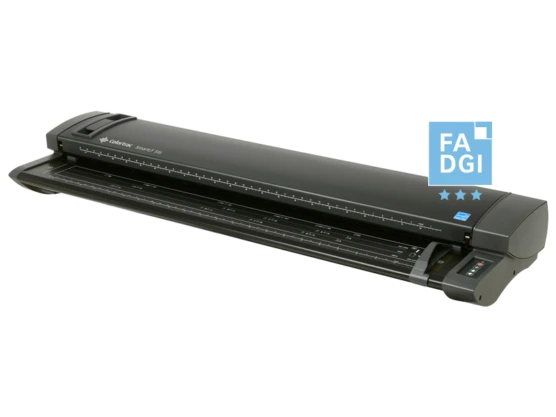
The Colortrac SmartLF SGi Series stands out for its ability to capture even the smallest details in technical drawings and CAD files. With its advanced scanning technology, it ensures that no line or annotation is missed.
Key Features:
- High-resolution scanning with exceptional accuracy
- Wide-format support for oversized blueprints
- Advanced color reproduction for detailed visuals
- Ideal for industries where precision is critical
HP DesignJet T2600 MFP
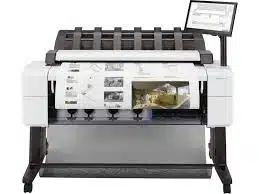
The HP DesignJet T2600 MFP is designed with collaboration in mind. It combines scanning and printing while offering cloud-enabled features, making it a strong choice for construction companies and teams that need real-time document sharing.
Key Features:
- Fast, high-quality scans and prints in one unit
- Cloud-enabled tools for remote access and collaboration
- Secure workflow features for sensitive documents
- Excellent for large teams managing multiple projects
Note: “If you’re comparing whether to buy a scanner or outsource, it’s worth exploring the best deals on large format scanning prices to understand the cost savings professional services can provide.”
📊 Comparison Table: Best Blueprint Scanners for Businesses in 2025
| Model | Best For | Key Strength |
|---|---|---|
| Epson SureColor T-Series | Architects & design firms | High-resolution scans with color accuracy |
| Contex IQ Quattro X | Engineering & construction companies | Ultra-fast scanning for high-volume tasks |
| Canon imagePROGRAF MFP | Businesses needing scan + print in one | Dual-function wide-format device |
| Colortrac SmartLF SGi | Firms handling detailed CAD drawings | Exceptional accuracy & detail preservation |
| HP DesignJet T2600 MFP | Large teams & construction companies | Cloud-enabled collaboration & secure scans |
The Benefits of Investing in Quality Blueprint Scanners
The upfront cost of a high-quality blueprint scanner for businesses may seem significant, but the long-term benefits far outweigh the initial investment. These devices go beyond simply converting paper into digital files—they improve efficiency, collaboration, accuracy, and overall business performance.
With a reliable scanner in place, companies enjoy:
- Improved collaboration across teams and departments
- Faster workflows with quick document access and sharing
- Reduced storage costs by eliminating bulky paper archives
- Data security through safe digital backups
- Stronger ROI from time savings, fewer errors, and streamlined operations
When businesses invest in a quality blueprint scanner, they gain a competitive edge while reducing risks tied to outdated paper processes.
Enhancing Productivity in Engineering and Construction Projects
Engineering and construction projects rely on constant communication and accurate information. Large-format documents like blueprints, CAD drawings, and engineering plans are central to these workflows, but managing them on paper often slows teams down.
By digitizing documents with a commercial blueprint scanner, companies can:
- Share project files instantly across offices and job sites
- Ensure everyone works from the latest version of a blueprint
- Reduce errors and delays caused by outdated paper documents
- Enable real-time collaboration regardless of location
Instead of hauling around heavy rolls of paper or struggling with outdated copies, project teams can access digital plans on laptops, tablets, or mobile devices. This seamless flow of information keeps projects on track and helps companies finish on time and within budget.
Improving Accuracy in Architectural Plans and Designs
In architecture, precision is everything. Plans and designs contain intricate details and exact measurements, leaving no room for errors. Relying on paper for revisions and distribution often leads to miscommunication, costly mistakes, and delays.
A high-quality blueprint scanner for architects ensures accuracy by creating high-resolution digital copies that capture every line and annotation. These digital files act as a single source of truth for all stakeholders.
Benefits for architectural teams include:
- High-resolution scans that preserve fine details and measurements
- Consistent access to updated files for architects, contractors, and clients
- Digital annotations and notes for easier revisions and feedback
- Reduced risk of costly rework caused by errors in paper-based workflows
With digital blueprints, teams can zoom in on details, mark up documents, and share updates instantly—ensuring accuracy and alignment at every stage of the project.
How to Choose the Right Blueprint Scanner for Your Business
Selecting the right blueprint scanner for your business is a critical decision. With so many options on the market, it’s important to carefully evaluate your needs before making an investment. The right choice can save time, improve accuracy, and boost productivity, while the wrong one can add unnecessary costs.
Start by asking yourself a few key questions:
- What document sizes do you need to scan (A0, A1, A2)?
- How frequently will you be scanning documents?
- Do you need color scanning, or is grayscale sufficient?
- Will your team benefit from advanced features like OCR or cloud connectivity?
Answering these questions will help narrow down your options and ensure the scanner fits both your workflow and your budget. If your team is unsure how to handle oversized files efficiently, check out this guide on how to scan large documents with top services and strategies for practical solutions.
Assessing Your Specific Scanning Requirements
Before choosing a large-format scanner, identify your core business needs. Every industry—from construction and engineering to architecture and design—has unique scanning requirements.
Key considerations include:
- Maximum Document Size: Ensure the scanner can handle the largest blueprints or drawings you typically work with.
- Document Types: Do you primarily deal with technical drawings, or do you also need to scan maps, posters, or photos? Choose a scanner that supports your full range of documents.
- Resolution & Accuracy: High DPI ensures small details, fine lines, and annotations are captured clearly.
- Scanning Speed: If you process high volumes, opt for a fast scanner to avoid bottlenecks.
- Automation & Ease of Use: Some scanners offer batch-feeding, auto-cropping, and built-in software for efficient workflows.
👉 Balance your business needs with your budget—don’t overpay for features you won’t use, but avoid cutting corners on essentials like resolution and durability.
Considering Space and Budget Constraints in Minneapolis–St. Paul
For businesses in the Minneapolis–St. Paul metro area, practical concerns like office space and budget are just as important as technical features. Many firms operate out of compact offices, making it essential to choose a scanner that fits seamlessly into the workspace.
Here’s what to consider:
- Space-Saving Design: Look for scanners with compact or vertical builds that don’t take up too much room.
- Integration with Existing Systems: Choose models that work smoothly with your current document management or cloud storage setup.
- Cost vs. Savings: While the upfront investment can be significant, remember that digital document storage eliminates the need for bulky filing cabinets and reduces long-term storage costs.
- ROI Potential: Consider how much time and money you’ll save through faster workflows, reduced errors, and improved collaboration.
By balancing functionality, space, and cost, businesses in Minneapolis–St. Paul can implement digital document management solutions that maximize efficiency without straining resources.
📝 Quick Buyer’s Checklist for Choosing a Blueprint Scanner
Before you finalize your purchase, review this checklist to ensure you’re getting the right scanner for your business needs:
- ✅ Document Size Support – Can it handle A0, A1, or A2 blueprints?
- ✅ Resolution Quality – Is the DPI high enough to capture fine details?
- ✅ Scanning Speed – Does it process documents quickly enough for your workload?
- ✅ Color & Grayscale Options – Does it meet your requirements for CAD, maps, or photos?
- ✅ OCR Capability – Can it convert scans into searchable, editable files?
- ✅ File Format Compatibility – Does it support PDF, TIFF, JPEG, and other common formats?
- ✅ Connectivity Options – Does it offer Wi-Fi, USB, or cloud integration?
- ✅ Space Requirements – Will it fit comfortably in your office or job site?
- ✅ Budget & ROI – Does the long-term value outweigh the upfront cost?
- ✅ Durability – Is it built for heavy, long-term use with a reliable duty cycle?
A scanner that checks most (or all) of these boxes will not only meet your current needs but also support your business as it grows.
Best Practices for Maintaining Your Blueprint Scanner
A blueprint scanner is a valuable investment, and just like any other precision machine, it requires regular care to maintain performance and extend its lifespan. Simple steps like cleaning the scanning surface, inspecting for wear and tear, and replacing parts such as ink cartridges or scanning lamps when needed can prevent costly downtime.
Another essential step is keeping your scanner’s software and firmware updated. Updates often include new features, improved performance, and critical security patches. For detailed maintenance steps, always consult your user manual or contact your scanner provider for professional assistance.
Regular Maintenance Schedule for Optimal Performance
Establishing a consistent maintenance routine ensures your scanner delivers accurate, high-quality scans for years. The frequency of maintenance depends on usage, but the following schedule works for most businesses:
Weekly Tasks:
- Clean the scanning glass and rollers with a microfiber cloth.
- Remove dust and debris from the exterior and paper feed areas.
Monthly Tasks:
- Inspect cables and connections for wear or looseness.
- Check scanner alignment and recalibrate if needed.
- Test scan quality to catch early performance issues.
Yearly or Bi-Annual Tasks (for heavy use):
- Schedule professional servicing for deep cleaning and parts replacement.
- Update software and drivers to the latest versions.
- Replace consumable parts (lamps, rollers, ink cartridges) as recommended by the manufacturer.
By sticking to a maintenance routine, businesses can:
- Reduce downtime caused by preventable issues
- Extend the scanner’s lifespan
- Ensure consistent scan quality
- Avoid costly repairs or premature replacements
Pro Tips for Extending the Life of Your Blueprint Scanner
Beyond regular maintenance, a few best practices can help you maximize the lifespan of your blueprint scanner and keep it performing at its best:
- Use a Dust Cover – Always cover your scanner when not in use to prevent dust buildup on sensitive parts.
- Keep in a Clean Environment – Place the scanner in a dust-free, temperature-controlled space to avoid overheating or contamination.
- Avoid Overloading – Don’t exceed the scanner’s recommended duty cycle (the maximum number of scans per day/month). Overuse can shorten its lifespan.
- Handle Documents Properly – Ensure blueprints and drawings are clean, flat, and free of staples or clips before scanning to prevent scratches or jams.
- Use Approved Cleaning Products – Avoid harsh chemicals; only use manufacturer-recommended cleaning solutions for glass and rollers.
- Update Firmware Regularly – Keep your scanner’s firmware and drivers updated for better performance, compatibility, and security.
- Train Your Team – Educate staff on proper handling and usage to reduce errors, misuse, or damage.
- Schedule Professional Servicing – Even with regular care, annual professional check-ups ensure your scanner stays in peak condition.
By following these tips, businesses can increase the return on investment (ROI) from their scanners, reduce repair costs, and ensure high-quality scans for years to come.
Troubleshooting Common Issues
Even with regular care, scanners may occasionally run into problems. Fortunately, most issues have simple fixes you can try before calling technical support.
| Issue | Possible Cause | Solution |
|---|---|---|
| Streaks or lines on scans | Dust or debris on the scanning glass | Clean the glass thoroughly with a microfiber cloth and scanner-safe solution. |
| Scanner not connecting | Loose or disconnected cables | Check all connections, restart the scanner, and ensure drivers are updated. |
| Paper jam | Incorrectly loaded or misaligned paper | Carefully remove jammed paper, reload correctly, and follow the manual’s guide. |
| Blurry or low-quality scans | Low resolution settings or calibration issues | Adjust DPI settings, recalibrate, and test scan quality. |
If the problem persists despite these troubleshooting steps, it’s best to contact your scanner’s technical support team or schedule professional servicing.
Conclusion
Investing in a high-quality blueprint scanner can significantly improve productivity and accuracy in industries such as engineering, construction, and architecture. By carefully assessing your business needs—document size, resolution, scanning speed, and budget—you can choose the right scanner that enhances your workflow.
Regular maintenance and timely troubleshooting are also essential for keeping your scanner in top condition and avoiding costly downtime. Whether you’re based in Minneapolis–St. Paul or beyond, the right blueprint scanner can transform how your business handles technical drawings, blueprints, and large-format documents.
If you’re looking for reliable blueprint scanning solutions tailored to your needs, explore our selection of scanners designed to bring precision, efficiency, and long-term value to your business.
Frequently Asked Questions
1. What is the difference between a regular scanner and a blueprint scanner?
Regular scanners are designed for standard document sizes like A4 or letter. Blueprint scanners, on the other hand, are built for large-format documents such as blueprints, CAD drawings, maps, and posters. They offer wide-format capability and high optical resolution, ensuring every line and detail is captured with accuracy.
2. Can I rent a blueprint scanner in Minneapolis–St. Paul?
Yes. Renting is a smart option for businesses that only need a scanner temporarily or want to test its benefits before purchasing. Several providers in the Twin Cities offer scanner rentals as well as professional blueprint scanning services.
3. How do I digitize old blueprints effectively?
To digitize old or fragile blueprints:
- Use a scanner with high resolution to capture fine details.
- Handle documents carefully and clean them before scanning.
- Save digital files in versatile formats (PDF, TIFF) for easy access and storage.
This process ensures accuracy while protecting the original documents.
4. Are there mobile solutions for scanning large-format documents?
Yes. While professional large-format scanners deliver the best results, mobile alternatives exist:
- Portable blueprint scanners – lightweight and easy to carry, suitable for on-site work.
- Mobile scanning apps – useful in emergencies but often compromise on resolution and accuracy for oversized documents.
5. What should I do if my blueprint scanner is not producing clear images?
Start with these quick troubleshooting steps:
- Clean the scanning glass thoroughly.
- Check and adjust the resolution/DPI settings.
- Ensure the document is loaded properly.
- If issues persist, consult your scanner’s user manual or contact technical support.